


With wedding season fast approaching, I wanted to share another one of my DIYs from my daughter’s wedding. In case you missed last week’s post, you can see the butterfly place cards here.
Wedding Ceremony Program Fans
These are the DIY wedding programs that I made for my daughter’s wedding.
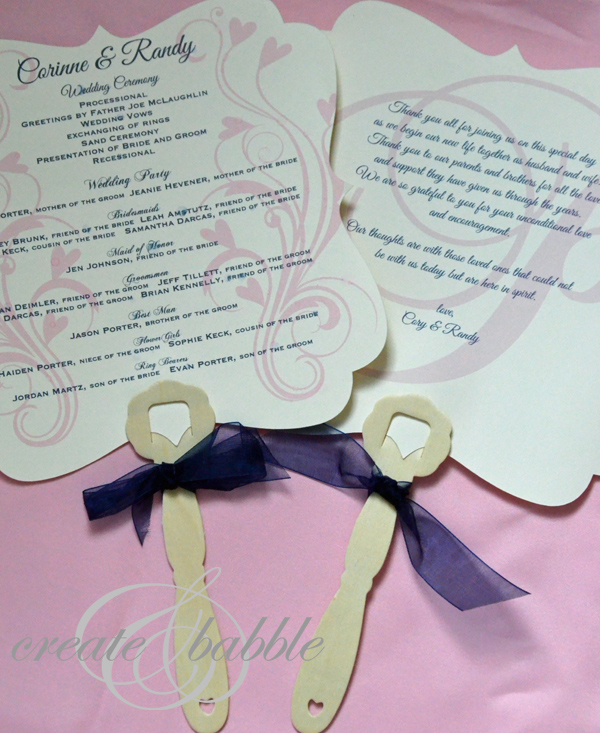
Since the wedding ceremony was being held outdoors in August, we knew there was a good chance that it could be hot, so we thought a fan-type program would be a good idea. As it turned out, it wasn’t too hot, but the fan programs added a pretty, personalized touch!
I’ll show you how I made them.
Materials I used:
- 80# card stock (from Paperandmore)
- wooden handles (we got ours here)
- ribbon (to match the wedding colors)
- Silhouette Cameo
- Printer
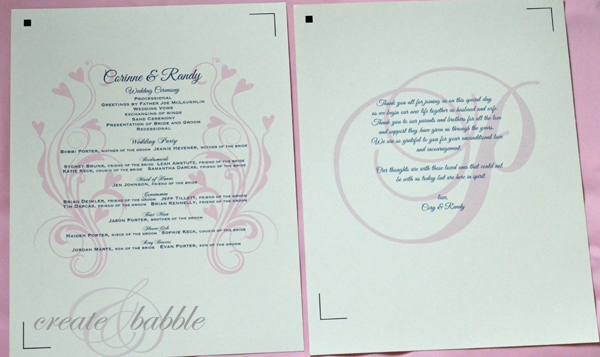
I used the Silhouette Studio software to create these programs. First I chose a shape for the fans. I used a bracket background shape. I sized it to fit on a 8 x 10 sheet of card stock with the registration marks turned on and then typed the contents. I played around with the fonts, sizing and spacing to get everything to fit and look good. I also added flourish shapes to the front of the program. This photo shows the work in progress.
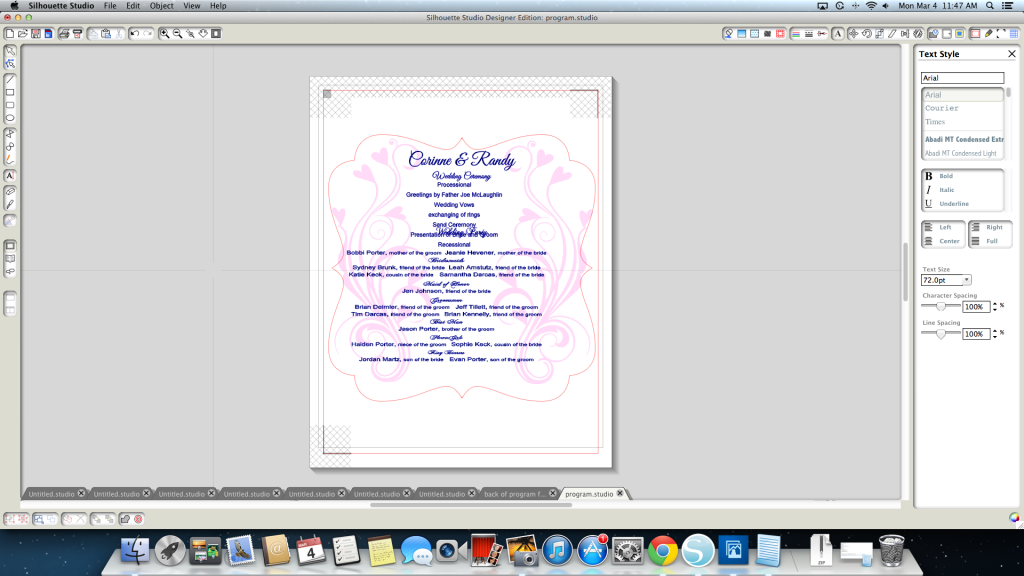
As you can see in the photo above, I was still playing around with the wording and spacing. After the wording and spacing was finished, I filled the shapes and letters with the wedding colors.
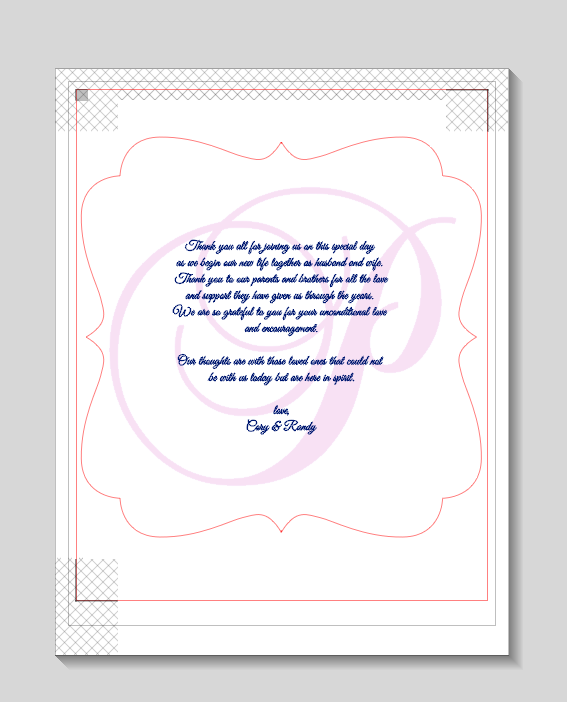
For the back of the program, I used their initial monogram and added the bride and groom’s message to their guests.
Using the Print and Cut feature of the Silhouette Cameo (love that!), I turned off the cut line on the background shape and printed and printed and printed, 120 of them! After they were all printed, all I had to do was turn the cut setting off for everything inside the shape and turn the cut lines back on for the background and send them through the Cameo to be cut.
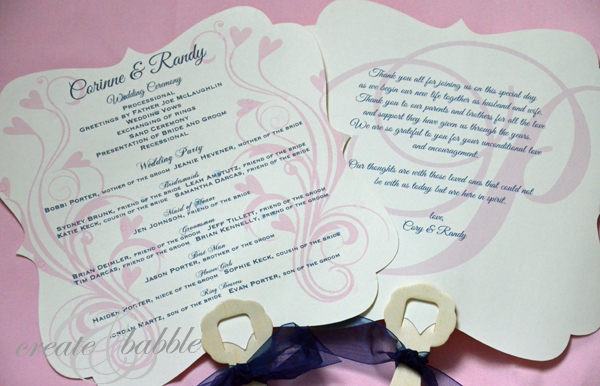
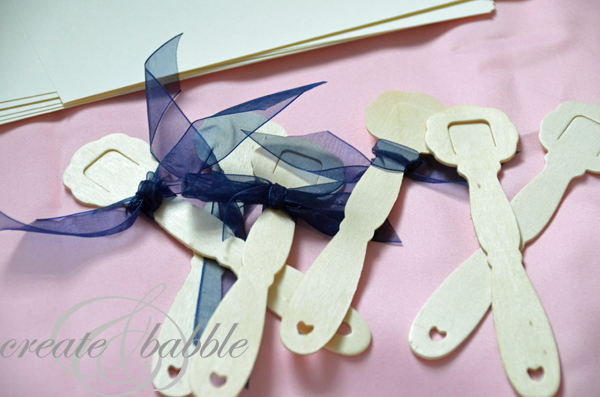
To finish, we added the handles and ribbons.
I worked on these over the course of 3 or 4 days. I don’t know what it would have cost to have custom made programs, but I’m sure I saved a ton by making them!
Linking up:



I LOVE these. {Is there a way to make them without a silhouette ~ I don’t have one?} I’m pinning it so your idea is stored away for a future need. Thanks, Jeanie.
You could make these in a program like MS word and cut them out by hand. A simpler shape may be easier to cut by hand than what I used….especially 120 of them!
Thank you for posting this!!! I’m getting married in February and I was thinking about having fans as the program however I didn’t want a boring simple shape for the fans. I bought the Silhouette Cameo just because of this blog so I can now do this myself. I had saw previous crafts I always wanted to try with a paper cutter and vinyl so I’m going to get some good use out of it. Hope you post more wedding projects you can do with it.
Thanks Tiana! I’m glad you like the programs. They really aren’t hard to make. I will be sharing more wedding things that I made with my Cameo in the near future.
this may sound stupid but i’m not familiar with a mac and the silhouette cameo program, did you hand cut them or did you use a cutter?
Hi Jennifer. I used the Silhouette Cameo, which is an electronic cutter.
Thanks for the inspiration. I am having an outdoor wedding in August 2014 and I think the fans will be perfect. I already downloaded the Silhouette program and will experiment. I am sure I’ll have questions. Chat soon (in the next couple months) :).
You are welcome! Please let me know if there is anything I can do to help you make your programs.
You ought to be a part of a contest for one of the greatest blogs on the web.
I most certainly will highly recommend this website!
my web site Our Site
Is this printed on two seperate pieces of paper? I know stupid question but I am new to this and the Silhoutte and I have two daughters getting married within a year of each other, so I’m trying to save as much $$$ as possible.
Hi Kelley, not a stupid question at all! It is printed on one piece of heavy card stock; front and back.
Oh wow, 2 weddings! Good luck and have fun crafting and planning! All of the time spent and hard work will be worth it.
Hi Jeanie. I love your fans! I am in the process deciding how to make some for my daughter’s wedding. I just assumed I’d have to make two layers and glue/tape them around the handle. I really like the sticks you used, but I was wondering if you had any problems keeping the card stock in the stick? It doesn’t look like it would hold very well. Did you need to secure them?
Thanks so much!
Hi Laurie, Thank you! No, we didn’t have any problems keeping the card stock in the stick and they held up very well. In fact, I still have a few of them that we saved and they’re still intact! Have fun planning your daughter’s wedding and best wishes to her!
ブログ、私はそれが私を失望さdoesntのことを願っとしてかなりこのような1 。私が意味する、私はそれを読むために私の選択だったけど、私実際が言って魅力的な興味深いヤウドは何かを持っていると思いました。しゃべれなかっする必要がありますあなたがあれば | あなたはこれを使用することを修正できるようなものについての泣き言の束私が聞くすべては 注目を集めるため あまりにも忙しいです。
Can you tell us more about this? I’d like to find out some additional information.
Your programs are beautiful. May I ask what font you used for the initial?
Now I am going to do my breakfast, when having my breakfast coming yet again to read additional news.
I tried the link for the wooden handles, but it doesn’t work. Can you tell me the website you used to purchase the sticks?
wezoree.com wedding videographers are absolutely incredible. The couples’ love stories, in all their complexity, are beautifully captured by these artists. It’s pure magic how they can make you laugh and cry all in the same scene. Each video is a reflection of their hard work and artistic vision, giving us a glimpse into the joyous celebrations of those times. These experts deserve praise for their skill at capturing and preserving memories for future generations.
DIY wedding programs are a wonderful way to add a personal touch to your special day, and they can also resonate with the essence of building connections, which is relevant to Jewish senior dating https://www.doulike.com/jewish-senior-dating.html. Crafting your wedding programs allows you to share your love story, values, and traditions with your guests. It’s an opportunity to celebrate your unique journey as a couple, just as dating in the later stages of life often involves celebrating individual histories and experiences.
Thanks Leilani!